For the purposes of this discussion, I created a program in Python that provides my computer with random inputs. It can, for example, move the mouse cursor, click, and press any keys on the keyboard—all completely at random. Let’s call it OPICE-1 (after the infinite monkey theory). Here is the source code, though it’s not necessary to understand it:
import pyautogui
import random
import time
import sys

sys.setrecursionlimit(100000)
time.sleep(5)

def random_inputs():

    AllKeys = ['\t', '\n', '\r', ' ', '!', '"', '#', '$', '%', '&', "'", '(',
        ')', '*', '+', ',', '-', '.', '/', '0', '1', '2', '3', '4', '5', '6', '7',
        '8', '9', ':', ';', '<', '=', '>', '?', '@', '[', '\\', ']', '^', '_', '`',
        'a', 'b', 'c', 'd', 'e','f', 'g', 'h', 'i', 'j', 'k', 'l', 'm', 'n', 'o',
        'p', 'q', 'r', 's', 't', 'u', 'v', 'w', 'x', 'y', 'z', '{', '|', '}', '~',
        'accept', 'add', 'alt', 'altleft', 'altright', 'apps', 'backspace',
        'browserback', 'browserfavorites', 'browserforward', 'browserhome',
        'browserrefresh', 'browsersearch', 'browserstop', 'capslock', 'clear',
        'convert', 'ctrl', 'ctrlleft', 'ctrlright', 'decimal', 'del', 'delete',
        'divide', 'down', 'end', 'enter', 'esc', 'escape', 'execute', 'f1', 'f10',
        'f11', 'f12', 'f13', 'f14', 'f15', 'f16', 'f17', 'f18', 'f19', 'f2', 'f20',
        'f21', 'f22', 'f23', 'f24', 'f3', 'f4', 'f5', 'f6', 'f7', 'f8', 'f9',
        'final', 'fn', 'hanguel', 'hangul', 'hanja', 'help', 'home', 'insert', 'junja',
        'kana', 'kanji', 'launchapp1', 'launchapp2', 'launchmail',
        'launchmediaselect', 'left', 'modechange', 'multiply', 'nexttrack',
        'nonconvert', 'num0', 'num1', 'num2', 'num3', 'num4', 'num5', 'num6',
        'num7', 'num8', 'num9', 'numlock', 'pagedown', 'pageup', 'pause', 'pgdn',
        'pgup', 'playpause', 'prevtrack', 'print', 'printscreen', 'prntscrn',
        'prtsc', 'prtscr', 'return', 'right', 'scrolllock', 'select', 'separator',
        'shift', 'shiftleft', 'shiftright', 'sleep', 'space', 'stop', 'subtract', 'tab',
        'up', 'volumedown', 'volumemute', 'volumeup', 'win', 'winleft', 'winright', 'yen',
        'command', 'option', 'optionleft', 'optionright']


    while True:
        rnd_A0 = random.randint(0, 1)
        rnd_B0 = random.randint(0, 2)
        rnd_C0 = random.randint(0, 4)

        if rnd_B0 == 0:
            pyautogui.press(AllKeys[random.randint(0, len(AllKeys)-1)])

        elif rnd_B0 == 1:
            multi_key = []
            for i in range(0, random.randint(0, 5)):
                multi_key.append(AllKeys[random.randint(0, len(AllKeys)-1)])
            pyautogui.hotkey(*multi_key)

        else:
            if rnd_A0 == 0:
                pyautogui.moveTo(random.randint(0, pyautogui.size()[0]), random.randint(0, pyautogui.size()[1]), duration=.2)

                if rnd_C0 == 0:
                    pyautogui.click()

                elif rnd_C0 == 1:
                    pyautogui.doubleClick()

                elif rnd_C0 == 2:
                    pyautogui.click(button='right')

                elif rnd_C0 == 3:
                    pyautogui.click(button='middle')
            else:
                pyautogui.dragTo(random.randint(0, pyautogui.size()[0]), random.randint(0, pyautogui.size()[0]), duration=.2)

        time.sleep(.1)


def ignore_errors():
    try:
        random_inputs()
    except Exception:
        ignore_errors()


ignore_errors()
To illustrate, I recorded OPICE-1 while it was running, creating the first video below. Since it ran for about an hour, I sped up the first video many times over to create the second video, so that viewers don’t have to watch the entire first video but can still see what kinds of actions the OPICE-1 program likely performed.
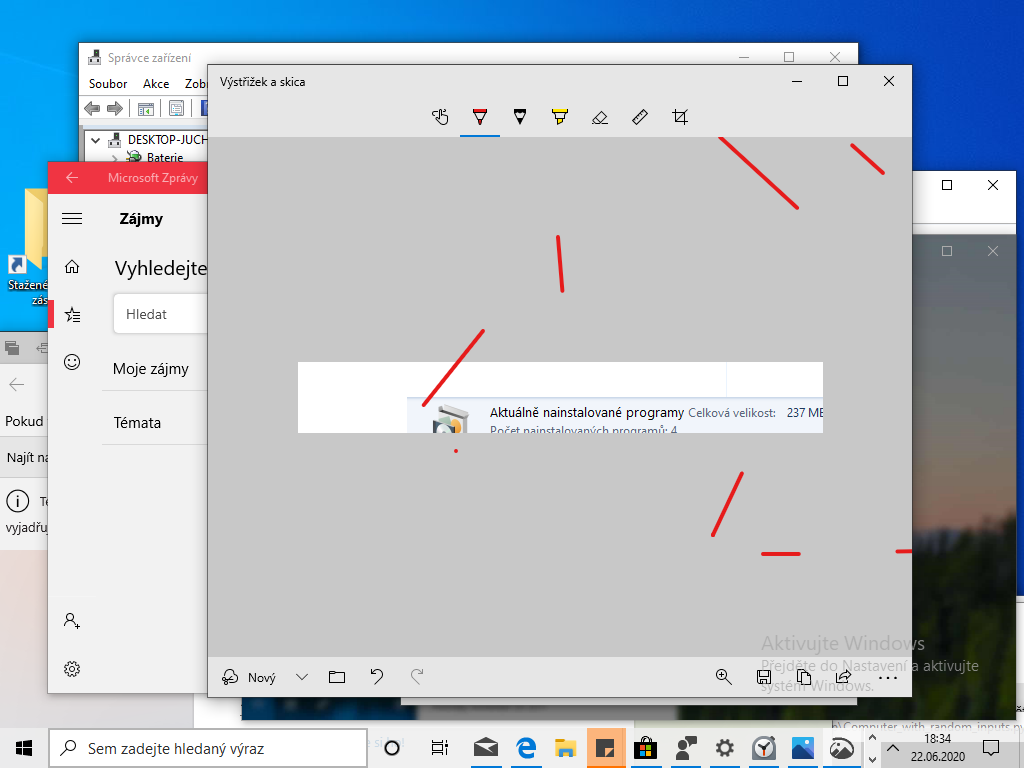
As you can see in the videos, at a certain point, the OPICE-1 program begins to rewrite its own code. The entire video ends with the operating system freezing and then crashing. As I continued to experiment with it, the OPICE-1 program did several other remarkable things. For example, it opened the Bing search engine and typed “9/11” into it, took a screenshot, restarted the computer, installed a card game, or “drew” something abstract (see the image below).
So it can be said that if the OPICE-1 program were to run for an unlimited amount of time, it could theoretically do EVERYTHING (by “EVERYTHING” I mean perform all operations that a computer allows, which is why I’m writing it in all caps), what could a user of the same computer do? After all, it could theoretically create a folder on the desktop, open a web browser and search for something, open Word and write this essay, write any book, create electronic music, write a program in Python, write itself, and so on. It could also shut itself down, shut down the entire computer, or corrupt its own code. And this is precisely where it becomes clear that it’s impossible for the OPICE-1 program to do EVERYTHING once it’s running—after all, it would also have to take the step that would stop it. All right, so what if it did EVERYTHING without taking the step that would cause it to stop, and then performed that step last? While this is highly unlikely, it’s not impossible. Unfortunately, there’s still one catch—there are many steps that lead to its termination. If it performed one of them, it wouldn’t be able to perform any subsequent steps, and that contradicts the original assumption that the OPICE-1 program can do EVERYTHING. Therefore, this program cannot do EVERYTHING.
One more solution comes to mind. The OPICE-1 program cannot do EVERYTHING because it is a subsystem of the operating system. When the operating system shuts down due to the program, the program itself also stops working. Here is a simple diagram illustrating the relationship between the operating system and the OPICE-1 program. The arrows indicate “affects.”
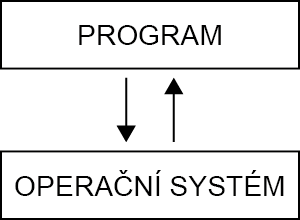
The problem, then, is that the operating system affects the program. Would it therefore be possible to “break” this loop and create a program that is completely independent of the operating system? A program that affects the operating system, but at the same time cannot be affected by the operating system itself? A program whose diagram looks something like this?
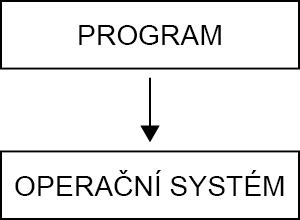
In other words—is there a similar program that can handle EVERYTHING, but cannot stop itself (or rather, this isn’t even possible due to the very nature of its design)? We’ll call such a program OPICE-2. In the following steps, I’ll try to explain a method that, while a bit absurd and certainly one that could be devised more elegantly, is probably the most suitable for illustrating my idea. I’ve tried to visualize what such an operating-system-independent program might look like.
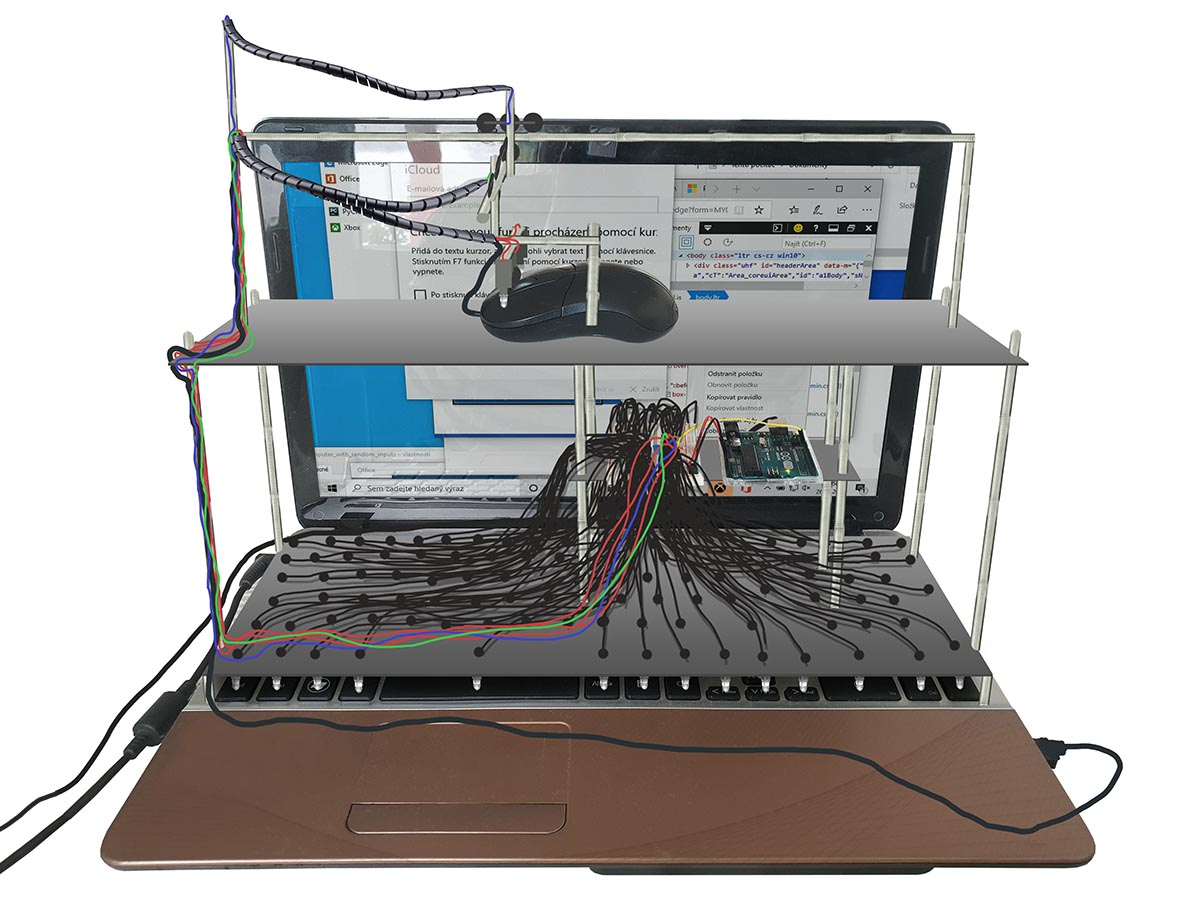
The lower section of this device is used to mechanically press the keys on the keyboard. The upper level, in turn, is used for mechanically moving the mouse and clicking. All of this is connected to a simpler computer (e.g., an Arduino, Raspberry Pi, etc.), which can be seen on the middle level. Our OPICE-2 program is running on this computer. It is important to note that only the mouse is connected to the laptop—nothing else. Therefore, the simpler computer must not be connected to the laptop in any way, and communication between them must remain strictly one-way (the simpler computer controls the laptop, not the other way around). Furthermore, the simpler computer on which our OPICE-2 program code is stored should not be connected to the internet, since the internet is, for the purposes of this discussion, one big maze of tangled paths, and if our device were to venture into them, no one could accurately predict the consequences. For example, using the internet and the laptop, our simpler program could somehow connect to itself and shut down.
This device appears to be unable to act on itself and thus shut itself down. But is that really the case? Could a situation arise in which the device would shut itself down? One such situation comes to mind: Using the internet, the device reports a bomb to the appropriate authorities at its current location, so a bomb squad arrives and defuses it. This situation is, of course, highly unlikely, but again, not impossible.
Wouldn’t it be enough, then, to simply disconnect the laptop from the internet? That would certainly prevent the situation described above, but it wouldn’t help in this case either. I can think of other situations in which the device could indirectly affect itself. Here’s one possible scenario: A person who knows nothing about the device walks past the laptop. Just as they’re looking at the device, the message “TURN ME OFF” appears on the screen. This message (or another, far more forceful one) could convince the person to actually turn the device off.
All right, but what about simply ensuring that the device is incapable of any output (no monitor, no speakers, etc.)? That way, the device could not influence the outside world, which in turn could not influence the device and cause it to shut down. That sounds reasonable, but it’s not very realistic. The device could still communicate in various ways, such as by turning the keyboard backlight on and off, through differences in noise when the laptop is on versus off, or even through differences in processor temperature. I don’t think it’s possible to create a device that is part of this world and yet doesn’t interact with it in some way.
On the other hand, one could argue that a computer user could also destroy themselves simply by pressing keys and clicking the mouse. For example, they could use the dark web to order their own murder, and so on…
I’ll conclude this reflection by stating that if a program were to interact with the outside world in any way, it could ultimately shut itself down—even though, in theory, the program is capable of doing everything a user could do.